
Playgram Casino Telegram Bot for Australia
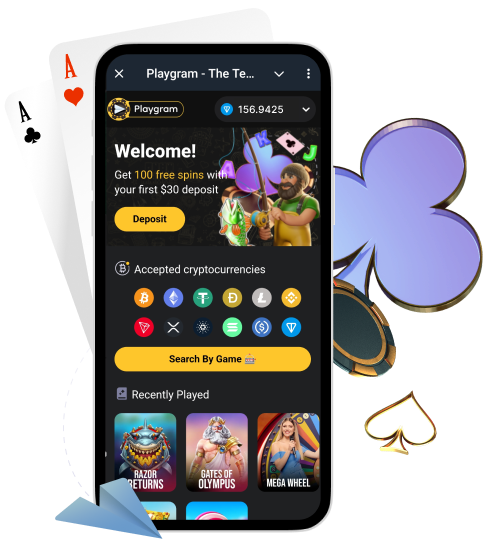
Playgram is a Telegram-first casino experience: instead of a classic login page, you start inside Telegram, open the bot, fund your balance with crypto, and play from the in-bot lobby. This home page is your quick hub: official entry points, how the cashier works, the minimum deposit/withdrawal limits, the key withdrawal fee rule, and what to do if something doesn’t work.
Important for Australia: Playgram’s own Terms list Australia and its territories as a restricted jurisdiction. If you are in Australia, treat availability as “must be checked” before you deposit. Start with our Australia access rules page and always follow local laws.
What Playgram Is on Telegram
Playgram is built around Telegram: you interact with the casino through a bot, use an in-bot cashier for deposits and withdrawals, and navigate games inside Telegram. It’s fast, mobile-friendly by default, and designed to keep key actions (funding, history, support) in one place.
Before you do anything with real money, bookmark Terms and rules and always compare what you see in the bot with the Terms. If anything conflicts, the Terms and official support response should be your reference.
Official Bot and Support Contacts
The safest way to start is through official Telegram handles. Use the table below to avoid clones and “copy bots”.
| Destination | Telegram handle | Use case |
|---|---|---|
| Play bot | @Playgram2bot | Start, account flow, lobby, cashier |
| Community | t.me/playgrammers | Announcements, help from other players, updates |
| Support | @playgramhelp | 24/7 questions, deposits/withdrawals issues |
| Manager (community) | @Playgram_casinomanager | Escalations from the community channel |
If you need a step-by-step on what to send and how to speed up replies, use our support contact checklist.
Australia Availability and Access Rules
If you are in Australia, do not assume access will work. According to Playgram’s Terms, Australia is listed among restricted jurisdictions. Availability can also change without notice, and some third-party review sites have previously labelled the project as “closed”. Because of that, your safest approach is “verify first, then fund”.
- Check the bot opens normally and you can reach the cashier menu.
- Read the jurisdiction/restricted-use section in the Terms before you deposit.
- Never rely on unofficial “mirror bots” or forwarded links from strangers.
- If you see access limitations, do not try to bypass them; contact support and ask what is available for your region.
Full guidance (AU-first): availability and access in Australia.
How Login Works in Telegram
There is no classic “email + password” login. Your Telegram account is the entry point: you open @Playgram2bot and follow the in-bot flow. If you switch devices, you’re still using the same Telegram identity, so keep Telegram security tight (PIN, 2FA, device control).
Account Setup and Security Basics
- Enable Telegram 2-Step Verification and protect your SIM/email.
- Do not share screenshots that expose wallet addresses, balances, or transaction IDs publicly.
- Use one device you trust for cashier actions.
- When support asks for documents, send them only via official support routes.
For personal data rules and document handling, see privacy details.
Cashier Overview: Where Money Actions Live
Most Telegram casinos keep money actions inside a cashier section. In Playgram, you typically use the bot menus to find deposit, withdrawal, and history.
- Open @Playgram2bot and tap Start (or re-open the chat).
- Open the cashier/wallet menu (deposit/withdraw options live there).
- Use History/Transactions to check statuses.
- Copy the address (and pick the correct network) before sending crypto.
If you want a dedicated checklist for funding, use deposit step-by-step.
Deposit Methods and Supported Crypto
Playgram positions itself as a crypto-first cashier. The supported set shown on its cashier pages includes major coins and stablecoins (for example BTC, ETH, USDT, USDC, TON and more). The key rule is simple: always match the correct network for the selected coin and use the minimum deposit thresholds.
For a consolidated view of currencies and wallet hints, open supported crypto options.
Minimum Deposit Limits by Coin
Below are the minimum deposit limits commonly displayed for Playgram’s cashier. If your deposit is below the minimum, it may fail or not credit automatically.
| Coin | Minimum deposit | Notes |
|---|---|---|
| BTC | 0.0001 | Confirm BTC network |
| ETH | 0.001 | Confirm Ethereum network |
| USDT | 2.0 | Choose the exact network (e.g., ERC/TRC) shown in cashier |
| LTC | 0.01 | Confirm Litecoin network |
| TON | 0.1 | TON transfers are fast; still verify address format |
| USDC | 5 | Match the network to your wallet |
| Coin | Minimum deposit | Notes |
|---|---|---|
| BNB | 0.01 | Confirm BNB network shown in cashier |
| DOGE | 1 | Double-check address before sending |
| TRX | 10 | TRON network only |
| XRP | 0.001 | Check if destination tag is required |
| ADA | 2 | Confirm Cardano network |
| SOL | 0.01 | Confirm Solana network |
| WalletConnect | 0.001 ETH | Use only the wallet connector flow shown in the cashier |
How to Make a Deposit Safely
- Open the cashier deposit screen and select the exact coin you will send.
- Copy the address from the cashier and verify the network matches your wallet.
- Send an amount at or above the minimum deposit for that coin.
- Save your TxID (transaction hash) and timestamp.
- If it doesn’t credit, contact support with TxID, coin, network, amount and time.
If you want a full troubleshooting flow, see message support correctly.
Withdrawal Rules You Must Know
Withdrawals in crypto are usually straightforward, but the rules matter. The most important ones are: minimum withdrawal, the “1x deposit” condition, and the fee that can apply if you withdraw without meeting it.
| Rule | Value | Where it applies |
|---|---|---|
| Minimum withdrawal (general) | €10 (or equivalent) | Per transaction, except account closure cases |
| Deposit rollover requirement | At least 1x of deposit | To avoid withdrawal commission |
| Withdrawal commission if not met | 8% (minimum €4) | Applied when the 1x deposit condition is not satisfied |
| Monthly withdrawal maximum | €500,000 per month | Total monthly cashouts cap |
For a deeper breakdown and examples, open cashout requirements.
Minimum Withdrawal Limits by Coin
Even if you meet the €10 (or equivalent) rule, coin-specific minimums can still apply. Always check the in-bot cashier screen before you submit.
| Coin | Minimum withdrawal | Notes |
|---|---|---|
| BTC | 0.0002 | Confirm BTC address format |
| ETH | 0.01 | Gas/network matters; verify network |
| USDT | 1.0 | Use the network shown in cashier |
| LTC | 0.01 | Confirm Litecoin network |
| TON | 0.1 | Verify TON wallet address |
| USDC | 5 | Network must match your wallet |
| Coin | Minimum withdrawal | Notes |
|---|---|---|
| BNB | 0.01 | Confirm network shown in cashier |
| DOGE | 1.0 | Double-check the address |
| TRX | 10 | TRON network only |
| XRP | 0.001 | Check if destination tag is required |
| ADA | 2 | Confirm Cardano network |
| SOL | 0.01 | Confirm Solana network |
When a Fee Can Apply
The key rule is simple: if you attempt to withdraw without rolling over your deposit at least once, a withdrawal commission can apply (listed as 8% with a minimum fee). If you want to avoid surprises:
- Confirm you have met the 1x deposit condition before withdrawing.
- Keep your bet history and cashier status consistent with the requirement.
- If the fee appears unexpectedly, capture screenshots and contact support with details.
Verification and Documents (KYC)
Even if the Telegram flow feels “lightweight”, verification can still be requested before withdrawals or as part of security/AML checks. Be ready for:
- Photo ID (passport or driver’s licence equivalent).
- Proof of address (recent document, readable and matching your details).
- Additional checks such as a selfie, extra questions, or a verification call.
If documents are requested, follow ID verification steps and submit clear, unedited files.
Processing Times and Status Checks
Crypto transfers are fast, but delays can still happen. If something is pending, check:
- Transaction confirmations on the correct chain.
- Whether you selected the correct network in the cashier.
- Your in-bot History/Transactions status.
- Minimum thresholds (deposit/withdraw) and any requirement flags.
Inactivity and Balance Maintenance
If you do not use the account for a long time, an inactivity fee can apply after 12 consecutive months of inactivity (only if the balance is positive).
| Condition | Fee | When it starts |
|---|---|---|
| No activity for 12 months (account in credit) | €5 per calendar month | After 12 months of inactivity |
Bonuses and Promo Messages
Promotions in Telegram casinos are often delivered as in-bot messages or through the community channel. Always check the bonus rules before you rely on a promo, and never assume “no conditions” if the Terms say otherwise.
See active mechanics and bonus explanations in current promos.
Games and Lobby Navigation
In Telegram format, the lobby is typically grouped by categories (popular slots, live casino, featured games). If you can’t find something:
- Use the bot menu buttons first (they are the intended navigation).
- Check “Featured” or “Popular” sections for rotating picks.
- Ask support which category contains the game you want.
Limits and Responsible Controls
We recommend you set personal limits and play only within your budget. If responsible play tools are available in your account menus, use them. If you need help stepping back, contact support and request account restrictions.
Common Issues: First Things to Check
- Are you using the official bot handle and not a clone?
- Did you pick the correct network for the coin?
- Is your amount above the minimum threshold?
- Do you have the TxID and the exact time of transfer?
- Is your withdrawal blocked by the 1x deposit requirement?
- Did you receive a verification request in the bot?
Quick Fixes in Telegram
Bot Does Not Open
- Update Telegram, re-open the chat with @Playgram2bot, and retry.
- Check if you see a regional access message.
- If you are in Australia, read AU access rules and contact support for clarity.
Deposit Not Credited Yet
- Confirm chain confirmations and network match.
- Compare the recipient address with the cashier address you used.
- Prepare TxID, coin, network, amount, time, and send to support help.
Withdrawal Pending Too Long
- Check History/Transactions in the bot.
- Confirm minimum withdrawal thresholds and the 1x deposit condition.
- Use withdrawal rules explained before escalating.
Fee Was Charged on Withdrawal
- Confirm whether your deposit rollover reached at least 1x.
- Capture the cashier screen and the fee line.
- Ask support to explain the calculation with your transaction details.
Verification Requested Before Cashout
- Prepare ID + address proof and upload clear documents.
- Make sure names and details match your account.
- Follow KYC instructions to avoid back-and-forth.
Sent Crypto on the Wrong Network
- Do not repeat the transfer.
- Collect TxID, network used, destination address, and wallet provider details.
- Contact support team immediately with the full packet.
Promo Message Not Showing
- Refresh the bot and check the promo/bonus area in menus.
- Check whether the promo has eligibility limits or time windows.
- Open bonus guide for where promos usually appear.
Support Is Slow to Reply
- Send one message with everything: TxID, coin, network, amount, timestamp, screenshots.
- Use a clear subject line like “Deposit not credited” or “Withdrawal pending”.
- Use the support template to speed up resolution.
Support: What to Send and How
If you want a fast answer, send a complete packet. This reduces back-and-forth and helps support trace transfers quickly.
- Issue type: deposit / withdrawal / verification / access
- Coin and network (exact)
- Amount
- TxID (hash)
- Time sent (your timezone)
- Destination address shown in cashier
- Screenshots (cashier + blockchain explorer summary)
Full instructions: how to contact support.
FAQ
What is Playgram in Telegram?
It’s a Telegram-first casino flow where you start via a bot, use the in-bot cashier, and play from the Telegram lobby.
Where is the official Playgram bot?
The commonly referenced official handle is @Playgram2bot. Always verify you are using the correct handle and avoid clones.
Can I use Playgram in Australia?
Playgram’s Terms list Australia as a restricted jurisdiction. Do not assume availability; check access first and follow local rules. Start here: Australia access rules.
Where do I see my deposit status?
Open the bot and check the cashier history/transactions section. Keep your TxID to confirm on-chain status.
What is the minimum deposit?
It depends on the coin. For example, BTC is commonly shown as 0.0001, USDT 2.0, TON 0.1, and USDC 5. Always confirm inside the cashier before sending.
What is the minimum withdrawal?
Terms commonly state a minimum withdrawal of €10 (or equivalent), plus coin-specific minimums (for example 1.0 USDT or 0.0002 BTC). Check your cashier screen for the exact number.
Why was a withdrawal fee charged?
A fee can apply if you withdraw without meeting the 1x deposit rollover requirement. Review the rule and your activity, then contact support with screenshots if it looks wrong.
What is the 1x deposit rule?
It means you must wager your deposited amount at least once before withdrawing to avoid a commission (as described in Terms).
What documents can be requested?
Common KYC requests include photo ID, proof of address, and sometimes a selfie or additional security checks, especially before withdrawals.
Where do I upload verification files?
Use the official in-bot flow or the channel instructed by official support. Follow verification steps for best results.
How do I find my transaction ID (TxID)?
Your wallet shows the transaction hash in the transfer details. Copy it and provide it to support if crediting is delayed.
What is the monthly withdrawal limit?
Terms commonly list a maximum of €500,000 per month in withdrawals.
When does inactivity fee start?
After 12 consecutive months of inactivity, an inactivity fee of €5 per calendar month can apply if the account is in credit.
How do I contact support faster?
Send one complete message with coin, network, amount, TxID, timestamp, and screenshots via support instructions.