
Playgram Payment Methods and Crypto Minimums
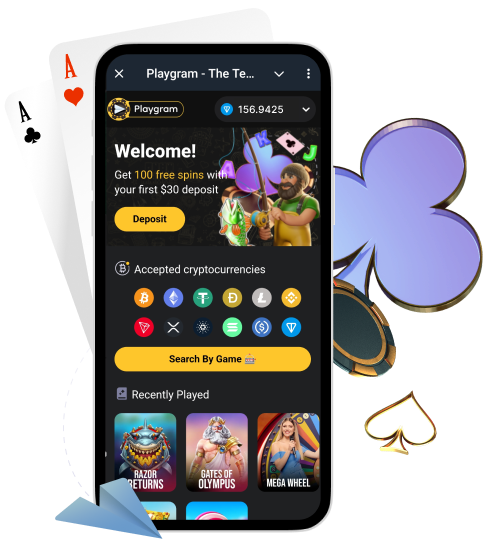
Playgram is a crypto-first Telegram casino experience. That means your deposits and withdrawals usually happen through crypto coins and stablecoins inside the in-bot cashier. This page is your practical payment hub: supported coins, minimum deposit and withdrawal limits, the network safety rules that prevent mistakes, and the core fee logic you should understand before you cash out.
Australia note: if you are in Australia, confirm availability first because Australia is listed as restricted in the Terms. Start here: Australia access.
Supported Payment Methods (Crypto-First)
Playgram’s cashier is commonly presented as crypto-only. The supported set includes major coins, stablecoins, and a WalletConnect option for compatible wallets.
| Method | Type | Notes |
|---|---|---|
| BTC | Coin | Network must match your wallet |
| ETH | Coin | Confirm the Ethereum network |
| USDT | Stablecoin | Choose the exact network shown in cashier |
| USDC | Stablecoin | Network selection is critical |
| TON | Coin | Use the address format shown in the cashier |
| LTC | Coin | Confirm Litecoin network |
| BNB | Coin | Confirm BNB network shown in cashier |
| DOGE | Coin | Double-check the address before sending |
| TRX | Coin | TRON network only |
| XRP | Coin | Check whether a destination tag is required |
| ADA | Coin | Confirm Cardano network |
| SOL | Coin | Confirm Solana network |
| WalletConnect | Connector | Use the in-cashier connection flow |
Minimum Deposit Limits by Coin
Deposits below the minimum can fail or may not credit automatically. Always confirm the exact minimum inside the cashier screen, then send at or above it.
| Coin | Minimum deposit | Network note |
|---|---|---|
| BTC | 0.0001 | Confirm BTC network |
| ETH | 0.001 | Confirm Ethereum network |
| USDT | 2.0 | Match the network shown in cashier |
| USDC | 5 | Match the network shown in cashier |
| TON | 0.1 | Verify TON address format |
| LTC | 0.01 | Confirm Litecoin network |
| Coin | Minimum deposit | Network note |
|---|---|---|
| BNB | 0.01 | Confirm BNB network shown in cashier |
| DOGE | 1 | Double-check the address |
| TRX | 10 | TRON network only |
| XRP | 0.001 | Check destination tag requirements |
| ADA | 2 | Confirm Cardano network |
| SOL | 0.01 | Confirm Solana network |
| WalletConnect | 0.001 ETH | Use the cashier’s WalletConnect flow |
Minimum Withdrawal Limits by Coin
Withdrawals can be limited by both general rules and coin-specific minimums. Check your in-bot cashier before you submit.
| Coin | Minimum withdrawal | Network note |
|---|---|---|
| BTC | 0.0002 | Confirm BTC address format |
| ETH | 0.01 | Confirm Ethereum network |
| USDT | 1.0 | Use the exact network shown in cashier |
| USDC | 5 | Match network with your wallet |
| TON | 0.1 | Verify TON wallet address |
| LTC | 0.01 | Confirm Litecoin network |
| Coin | Minimum withdrawal | Network note |
|---|---|---|
| BNB | 0.01 | Confirm BNB network shown in cashier |
| DOGE | 1.0 | Double-check the address |
| TRX | 10 | TRON network only |
| XRP | 0.001 | Check destination tag requirements |
| ADA | 2 | Confirm Cardano network |
| SOL | 0.01 | Confirm Solana network |
Network Safety: The One Rule That Saves Money
If you remember only one thing about crypto payments, remember this: coin is not enough, the network must match. Most payment problems come from sending on the wrong network.
- Select the coin in the cashier first, then copy the address from the cashier.
- Match the network in your wallet to the network shown in the cashier.
- Never paste an address from old chats or screenshots.
- Send at or above the minimum deposit for that coin.
- Save your TxID (hash) and timestamp the moment you send.
- If something goes wrong, do not send a second transfer “to fix it”.
Use the deposit checklist before you send funds.
WalletConnect Deposits: When It Makes Sense
WalletConnect can be a convenient option when the cashier supports a connected wallet flow. It may be shown as an alternative to copying an address manually.
- Open WalletConnect in the cashier and choose your wallet provider.
- Confirm the network and the exact token you will send.
- Approve the connection request inside your wallet.
- Confirm the transfer details and submit the transaction.
- Save your TxID and check status in history.
Stablecoins vs Coins: What to Choose
Many players prefer stablecoins for bankroll stability, while coins may be preferred for speed or wallet preference. Choose based on your risk comfort and your wallet setup.
- Stablecoins (USDT/USDC): better for avoiding volatility, but network choice matters the most.
- Coins (BTC/ETH/SOL/etc.): can move in price, but may be convenient if you already hold them.
Fees and the 1x Deposit Rule Before Withdrawals
Withdrawals are not only about coin minimums. There are core rules that can affect your final amount, especially if you attempt to withdraw without meeting the deposit rollover requirement.
| Rule | Value | Practical meaning |
|---|---|---|
| Minimum withdrawal (general) | €10 (or equivalent) | Your withdrawal must meet this baseline (plus coin minimums) |
| Deposit rollover requirement | 1x deposit | Wager your deposit amount at least once to avoid commission |
| Commission if requirement not met | 8% (min €4) | A fee can apply if you withdraw without meeting the 1x deposit rule |
| Monthly withdrawal maximum | €500,000 | Total monthly cashouts cap |
Read the complete cashout rules and keep payment terms bookmarked.
Processing Times: What Is “Normal” for Crypto
Most crypto transfers are quick, but “quick” still depends on network confirmations and the coin you use. If you’re waiting, do the basic checks first.
- Open your wallet and confirm the transaction is broadcast (has a TxID).
- Check confirmations on the correct blockchain explorer.
- Confirm the coin and network match the cashier selection.
- Check the in-bot History/Transactions for status updates.
- If it remains pending for a long time, contact support with the full packet.
Deposit Not Credited: Fast Troubleshooting
Below Minimum Deposit
- Compare your amount to the minimum deposit for that coin on this page.
- Check the cashier screen again to confirm the minimum for your selected network.
- If you already sent it, contact payment support with TxID and details.
Wrong Network Selected
- Compare the network used in your wallet to the network shown in the cashier.
- Collect TxID, coin, network used, amount, time, and destination address.
- Do not send a second transfer “to correct it”.
- Contact payment support with the full packet.
Not Enough Confirmations Yet
- Open the blockchain explorer and check confirmation count.
- Compare the time sent and the typical confirmation pace of that chain.
- Wait for a reasonable confirmation window before escalating.
- If it stalls, message payment support with TxID.
Address Mismatch / Copy Error
- Compare the destination address from your wallet to the address shown in the cashier at the time of deposit.
- Collect screenshots of the cashier deposit screen and your wallet transaction.
- Send TxID and screenshots to payment support.
WalletConnect Session Failed
- Disconnect and reconnect WalletConnect from inside the cashier.
- Update Telegram and your wallet app, then retry the flow.
- Capture the error screen if it repeats.
- Contact payment support with screenshots and your wallet provider.
Withdrawal Issues: What Usually Blocks Cashout
- Your amount is below the coin-specific minimum withdrawal.
- Your amount is below the general minimum withdrawal threshold.
- The 1x deposit rollover requirement is not met (fee can apply).
- Verification is requested before withdrawals (KYC).
- The destination address (or destination tag) is missing or incorrect.
If documents are requested, follow KYC requirements. For full rules, see cashout rules.
How to Message Support About Payments
When you contact support about deposits or withdrawals, send a complete packet in one message. This is the fastest way to get your transfer traced.
| Field | Example | Why it matters |
|---|---|---|
| Issue type | Deposit not credited | Routes your request correctly |
| Coin + network | USDT (TRC20) | Network mismatches are a top cause |
| Amount | 25.00 | Helps verify minimums and balance impact |
| TxID | 0x… | Primary trace identifier |
| Time sent | 2026-01-22 14:10 AEST | Helps locate logs and chain confirmation window |
| Destination address | Copied from cashier | Verifies you used the correct recipient |
| Screenshots | Cashier + wallet details | Confirms what you saw and what you sent |
If you need the full support workflow, see payment support.
FAQ
What payment methods does Playgram support?
Playgram is commonly presented as crypto-first. Supported options include major coins and stablecoins (such as BTC, ETH, USDT, USDC, TON and others) plus WalletConnect in supported flows.
What is the minimum deposit for USDT?
USDT is commonly listed with a minimum deposit of 2.0, but always confirm the exact number in the cashier for the network you selected.
What is the minimum withdrawal for BTC?
BTC is commonly listed with a minimum withdrawal of 0.0002, plus general rules can apply. Check your cashier screen for the exact current threshold.
Why does network choice matter?
Because sending the right coin on the wrong network can cause delays or loss. Always match the cashier’s network selection to your wallet’s network.
What is WalletConnect and when should I use it?
WalletConnect is a wallet connector flow. Use it when the cashier offers it and you prefer approving transactions directly in your wallet instead of copying addresses.
How long should a deposit take to credit?
Timing depends on network confirmations and the chain you used. If you have a TxID, you can track confirmations on a blockchain explorer and compare it to your in-bot history.
What is a TxID and where do I find it?
A TxID (transaction hash) is your transfer identifier. You can find it in your wallet’s transaction details and use it to track the transfer on-chain.
Why is my withdrawal fee showing?
A fee can apply if you attempt to withdraw without meeting the 1x deposit rollover requirement. Check your activity and the cashier rules, then ask support if it looks incorrect.
What is the 1x deposit rule?
It means you should wager your deposit amount at least once before withdrawing to avoid a commission as described in the Terms.
What happens if I send on the wrong network?
It can cause delays or loss depending on the coin and wallets involved. Do not repeat transfers; collect TxID and details, then contact support immediately.
What details should I send support about a payment issue?
Send coin + network, amount, TxID, time sent, destination address from the cashier, and screenshots of the cashier and wallet transaction.
Do stablecoins reduce volatility risk?
Yes, stablecoins like USDT/USDC reduce price volatility compared to coins, but network selection still matters most for successful transfers.